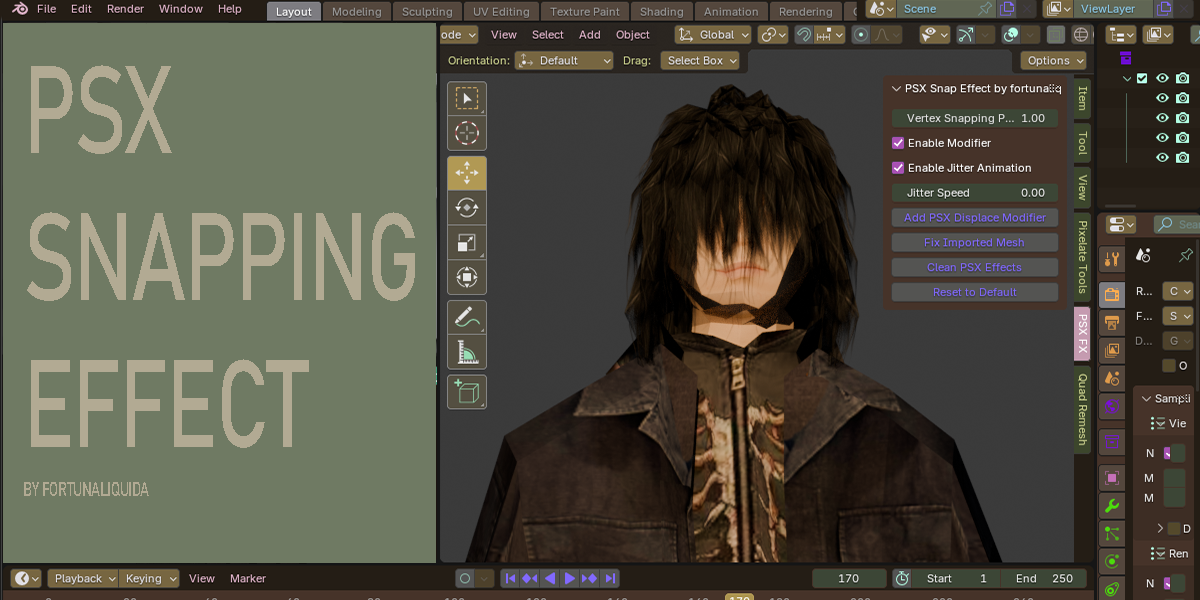
PSX Snap Effect by fortunaliquida is a Blender add-on for giving mesh objects the unstable vertex snapping and jitter associated with low-poly PS1-era visuals. It suits stylized horror and glitch-art scenes. Its displacement uses a preconfigured Clouds texture with cell noise, so the basic effect does not need a texture setup.
Adjust the distortion and motion
Vertex Snap Intensity changes the displacement strength in real time. Enable Jitter Animation for frame-by-frame movement, then use Jitter Speed to change how quickly the Empty that drives the texture moves. The jitter does not need keyframes. The add-on creates and reuses a PSX_VertexNoise texture, and its persistent handler is intended to keep the animation active after reopening a Blender file.
Clean up or prepare a mesh
Clean PSX FX removes the displacement modifier, noise texture and Empty from the selected mesh. Reset to Default restores the sliders and toggles. Fix Imported Mesh applies location, rotation and scale to an imported model, which the documentation recommends for OBJ and FBX files. You can also toggle the modifier off without removing it.
Compatibility and installation
The product listing names Blender versions 4.0 through 4.4 and the Cycles and Eevee render engines. The documentation says Blender 4.0 or later; compatibility beyond the versions specifically listed should be checked on the current product page. The add-on comes as one ZIP file. In Blender, open Edit > Preferences > Add-ons, choose Install, select the ZIP file and enable the add-on. In the 3D View, press N to open the sidebar and find the PSX FX tab.
The Superhive product listing identifies the license as GPL and credits the creator account to cat_tivi production. The product documentation describes the controls and installation steps.