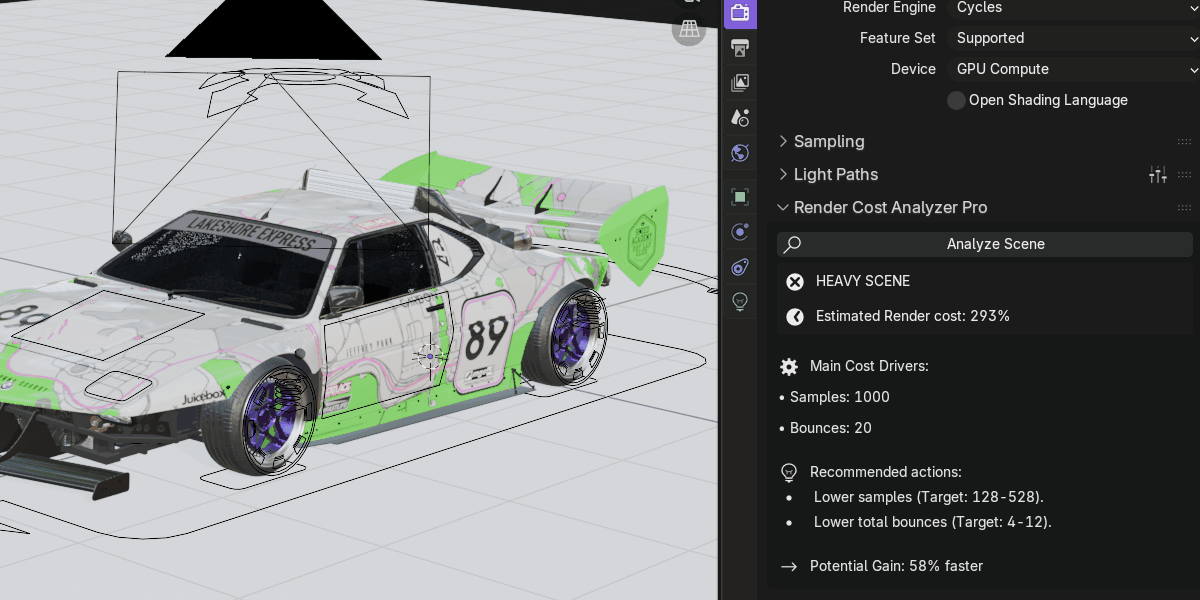
Render Cost Analyzer Pro is a Blender add-on by Merdan for reviewing a scene's render settings before sending it to a long render queue. Its Render Load Index compares scene load with an optimized baseline of 100%, showing how current settings affect GPU or CPU load. The listing names Cycles and EEVEE as supported render engines and gives a Blender version range of 3.6 through 5.0. See the product listing and documentation.
How to read the load index
The index compares render settings with scene complexity. The documentation defines 100% as a perfect match between them; the index does not estimate render progress. The documentation labels 150%-300% as high load and 400% or more as critical. Its Recommended Actions panel appears when load exceeds 120%, so it can appear before the high-load range. These thresholds help identify settings to inspect; the index itself does not report elapsed render time.
What it checks
The add-on identifies factors that can drive render time, including sample counts, light bounces and geometry density. Its documentation gives examples of recommendations:
- For a low-poly scene set to 4,096 samples, it suggests a target between 512 and 1,024 samples.
- For Cycles light paths, it may suggest reducing total bounces from 12 to 4.
- It flags unnecessary Subsurf levels, such as high levels on a mesh that is not in the foreground.
These are examples from the documentation, presented as suggested adjustments rather than universal settings. The add-on's contextual analysis distinguishes low-poly drafts from high-density production scenes and scales warning sensitivity to scene complexity.
When it may fit a render workflow
You can use its index to find settings worth inspecting, then review the listed bottlenecks and recommendations for your scene. The product listing names both Cycles and EEVEE, although the documentation's specific light-bounce example is for Cycles.
Compatibility and setup
The marketplace listing identifies the product as an add-on, marks it as Blender Extension Compatible, and gives the license as MIT. The quick-start documentation says to install the ZIP through Edit > Preferences > Add-ons > Install, enable Render Cost Analyzer in the add-on list, then open the Render tab in the 3D Viewport.