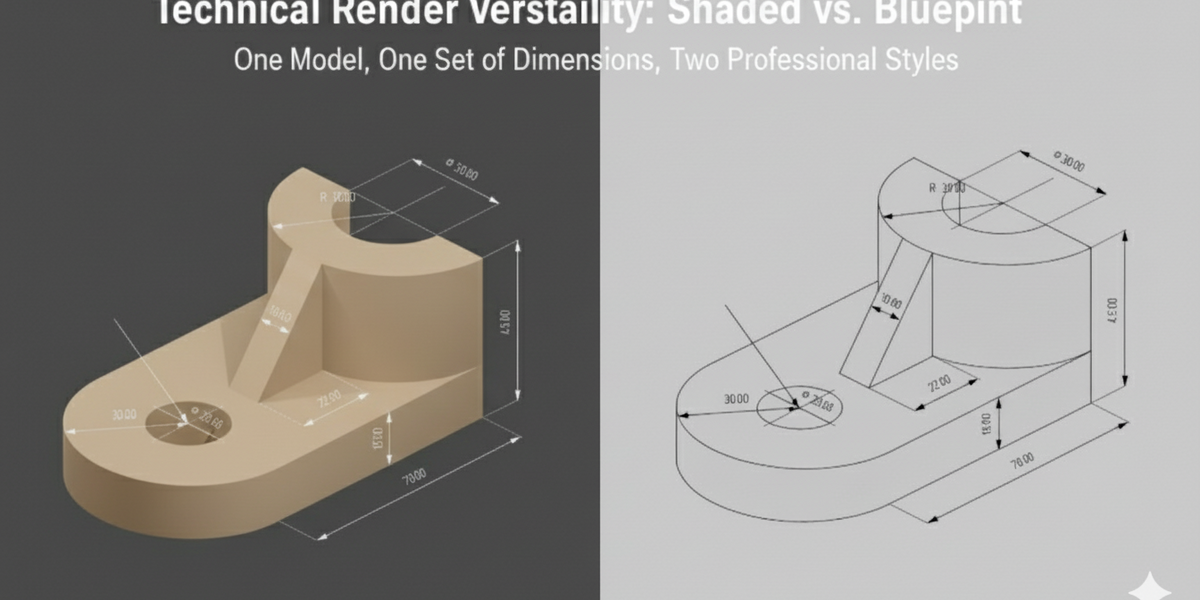
Snap Measure is a Blender add-on for creating dimensions, using measurements in modeling, and producing technical drawings. Its tools cover linear dimensions, angles, arc and bevel radii, plus snapping to common mesh points. It is aimed at workflows such as technical illustration, architectural visualization, and precision engineering.
Create dimensions with snapping and chains
Measurements can snap to vertices, edges and their midpoints, faces, and bounding box corners. New measurements can also snap to virtual points on existing ones. From edge selections, Snap Measure creates linear dimensions, angles, 3-point arc radii, and bevel radii.
Axis-locked projected dimensions measure distances between objects for plans and elevations. Chain Mode lets you place a sequence of measurements without restarting the tool, which can help when annotating a floor plan or a complex model.
Set how dimensions look and read
Control color, line thickness, font, font size, and decimal precision. Endpoint options include standard arrows, architectural T-shaped ticks, and filled arrowheads described by the product page as ISO-compliant. Add prefixes or suffixes, place extra text above or below a dimension, or override its displayed value. Values can also be rounded to a chosen interval, such as the nearest 5 mm.
Use measurements in modeling
A measurement can act as a driver source. Copy its value and paste it as a driver onto a Blender property, such as an object's scale or a modifier value. This lets a measured dimension control another part of the scene.
For vertex group scaling, assign mesh sections to a line's start and end vertex groups, then enter a new value in the interface to scale that section to the specified dimension. This is intended for adjustments such as changing an architectural element or a hard-surface part to a target size.
Render technical views and annotations
The Technical Renderer creates vector-style line drawings with a white background and the Snap Measure dimensions included. Hidden-line handling is optional. To make a section view, combine the renderer with a boolean cutter; the tool can add customizable cross-hatching automatically.
Render Overlay composites viewport measurements over a standard Cycles or Eevee render. That gives you a way to keep annotations visible in an illustrative render as well as produce a separate technical drawing.
Organize measurements and settings
Measurement Groups collect dimensions into named layers whose visibility you can toggle. Presets save and load collections of visual and behavioral settings. Favorite measurements can put a primary control slider in a quick-access panel, while Solo Mode hides the other measurements until you restore the full view.
Compatibility and listing details
The Superhive product listing identifies Snap Measure as a Blender add-on, marks it as Blender Extension Compatible, lists Blender 4.5–5.0, and gives its license as GPL. Check the listing for current compatibility and terms before installing it in a project.