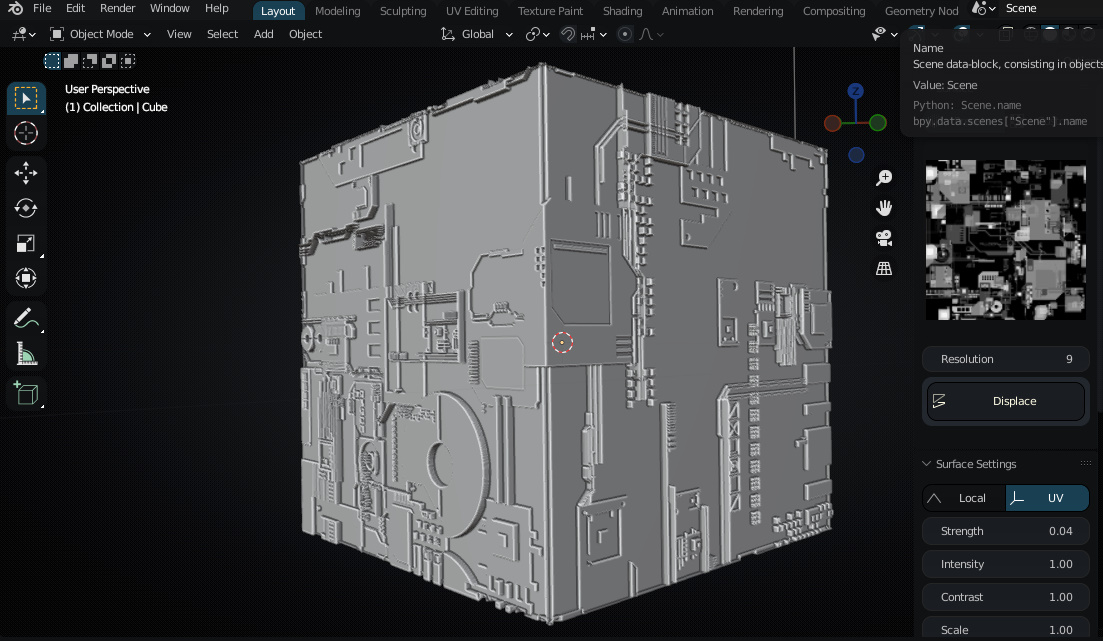
Surface Detail Addon is a Blender add-on by EdenWeby 3D for adding detailed surfaces to objects. The marketplace listing names more than 40 presets and a Custom Map option for applying your own texture. It focuses on hard-surface work, with the Custom Map option also used for organic surfaces, mountains and ground.
Create and apply a detailed surface
- Select one of the presets and choose the object to detail.
- Set Resolution above 7 for flat surfaces and to 9 for cubes and other multi-sided shapes, as the developer recommends. Use the UV option for primitives with more than one side, such as a cube.
- To use your own texture, open the Custom tab and paint it onto the chosen surface.
- When the surface is ready, click Apply in the Settings Panel. If you are working on more than two surfaces across different objects, the developer advises applying the current result before moving to the next object.
Resolution and hardware
The listed maximum is 10; the Subdivide button can add further detail when the computer can handle it. Higher resolution produces more surface detail, while more geometry can increase the workload.
The developer gives an Intel Core i5-8700K and 16 GB of RAM as a recommended baseline. The listing says the add-on can run on any PC, though slower machines may struggle with the workload. More RAM allows more polygons, while more cores and higher clock speed make displacement faster.
Compatibility and output
The marketplace lists Blender 2.8, 2.81 to 2.83, 2.9 to 2.93, 3.0 to 3.6, and 4.0. It does not confirm later releases, so check the current listing if you use another Blender version. The listing describes the add-on as viewport friendly, says its results can be exported, and identifies the license as GPL.