Takeitposy is a Blender add-on from POWERBLOW for posing a connected parent-child bone pair in Pose Mode. Set a target for the child bone's tail, then adjust the joint position and each bone's roll. It works with bone-local rotations and does not hold a bone in place like an inverse kinematics (IK) system; the result follows the armature and its parent bones.
Targets, joints and roll controls
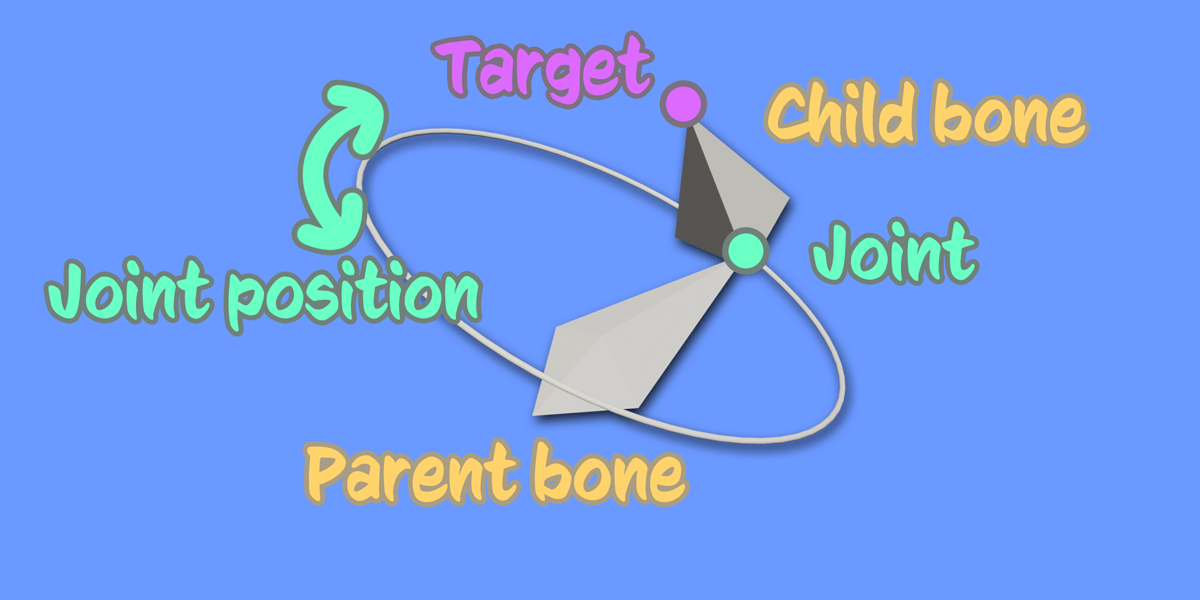
The Target sets where the child bone's tail should align. Joint sets the position of the shared connection between the parent and child bones, from 0 to 360 degrees. Separate Roll Controller values range from -180 to 180 degrees. The controls use the bone's local X or Z axis, with an option to reverse the roll direction. You can move the target with the mouse in the 3D View or snap it to the selected bone's tail.
Basic workflow
- First check the Blender and system requirements below. If they match your setup, install the ZIP file from Blender's Edit menu, under Preferences and Add-ons, then enable Takeitposy.
- Select the armature and switch to Pose Mode.
- Open the TakeItPosy tab in the Sidebar and enable View.
- Select two connected bones in a parent-child relationship. Confirm that the armature and every bone from the selected pair to the root have a scale of 1. Adjust Target, Joint and the Roll Controllers, then click Rotate.
- Disable View when you are finished using the add-on.
For the panel's Target, Joint and Roll Controller settings, consult the getting-started guide
Rotation limits and console output
Takeitposy has three Rotation Limit modes. On follows the bones' Limit Rotation constraints. On no order follows the numeric limits while overriding the constraint's axis order for the calculation. Off ignores those constraints. Only enabled Limit Rotation constraints in Local Space are checked; constraints in other spaces or switched off are ignored. Zero influence does not deactivate a constraint, and multiple supported constraints on a bone are all checked. If both Min and Max are zero on an axis, rotation on that axis is nearly locked and may be restricted to a plane. The documentation recommends allowing a small range, such as -10 to 10 degrees. Limit checks may be off by about 3 degrees. With Rotation Limit set to On or On no order, the virtual line turns red and Rotate is disabled when a bone reaches a limit; the line is white when the bone can rotate within the allowed range.
The console output includes the parent and child bones' rest-pose and current-pose rotations as quaternions, plus the Target and Joint positions in global coordinates. Those values can be used in scripts or automation.
Rig and system requirements
The selected parent and child bones must be connected: the parent's tail must match the child's head. The add-on handles only those two selected bones. The armature and every bone from the selected pair to the root must have a scale of 1. Keyframes, IK, Copy Rotation constraints or other dependency-graph changes to bone rotation may interfere with the result. POWERBLOW lists Sky by Blender Studio, VRM and Mixamo rigs as tested examples; Mixamo scale must be applied.
Takeitposy is listed for Windows 10 and 11, 64-bit, on x86_64 Intel or AMD CPUs. It does not run on ARM64 Windows, macOS or Linux. Blender version details differ across the listing: its overview names 4.2, 4.5, 5.0, 5.1 and 5.2, while the getting-started guide also lists 5.3 and product details give a 4.2 to 5.3 range. Check the current product listing for your exact Blender release before installing. The listing identifies the add-on as MIT licensed, with the full license in LICENSE.txt inside the ZIP.
For bug reports or feature requests, use POWERBLOW Support.