Toon Eyes Prep is a Blender add-on from Just Ducky Artworks for rigging procedural toon eyes in Auto-Rig Pro (ARP). It positions DadsCastle version 1 toon eyes on a character with temporary eyes, then creates the drivers and parenting for the rig. With geometry node eyelids, it also configures rig bone selections to exclude existing eyelid bones.
Why procedural toon eyes need preparation
These stylized eyes change material coordinates when they move, rather than rotating the eye mesh. That requires different drivers from a conventional eye rig. Toon Eyes Prep automates steps covered in the creator's four-part tutorial series.
Prepare the temporary eyes
Create the left and right temporary eyes from UV spheres, using resizing, rotation, and positioning. The product documentation warns that additional modeling or shaping may prevent the add-on from working correctly. Use the sphere's original north pole as the pupil. The creator's suggested starting orientation is to rotate each temporary eye -90 degrees on the X axis so the pupil points in the -Y direction, then scale, move, and rotate it into place.
Rigging workflow
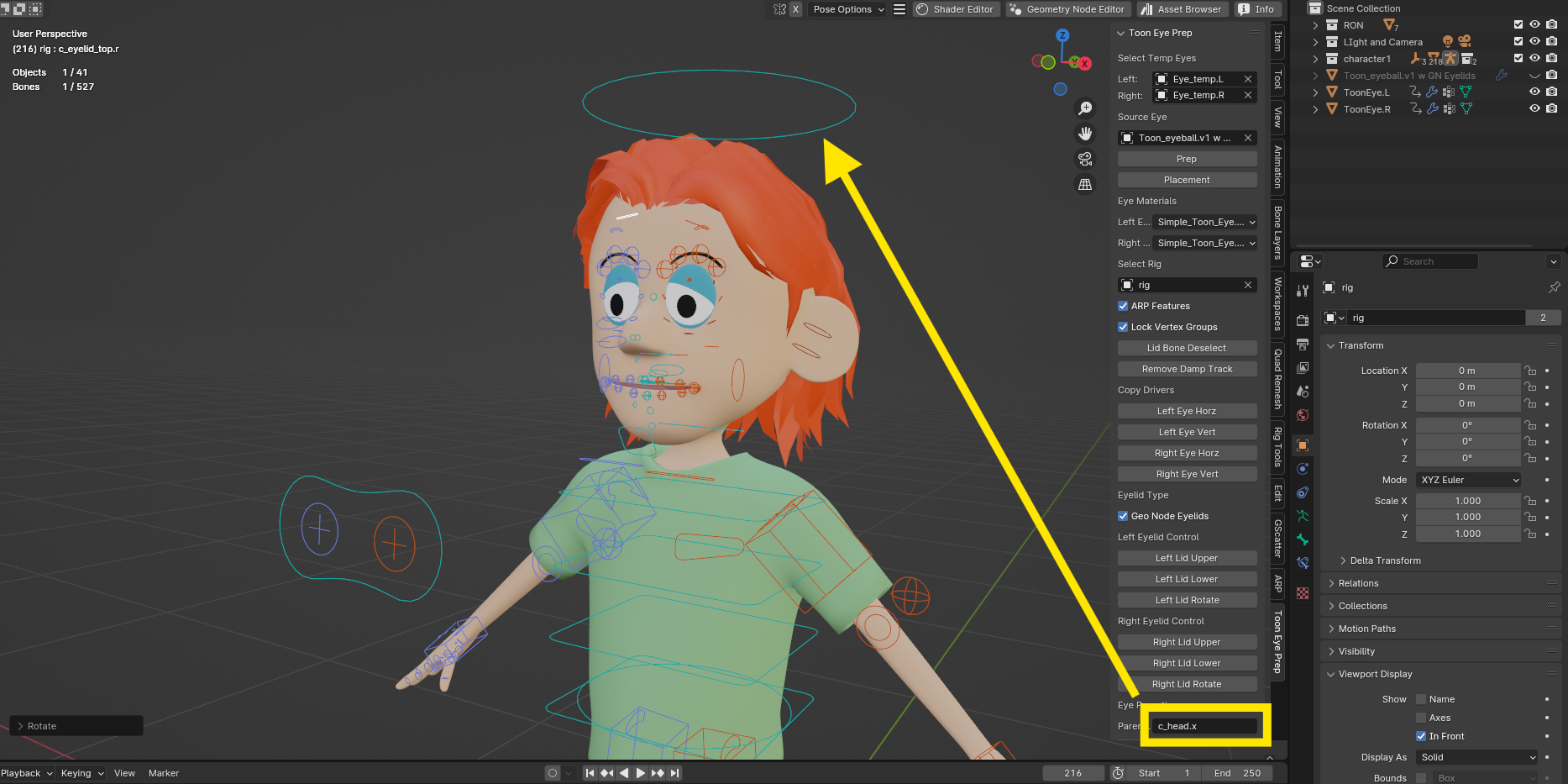
- In the add-on's N-Panel tab, select both temporary eyes, then the toon eyeball. Click Prep to create left and right toon-eye duplicates, including their materials and geometry node eyelids when used.
- Click Placement to replace and hide the temporary eyes. Create the Auto-Rig Pro landmarks, then use Match to Rig.
- After creating the ARP rig, select it in Toon Eyes Prep. Enable ARP Features, lock vertex groups, and, when using geometry node eyelids, deselect the ARP eyelid bones. Click Remove Damp Track.
- For geometry node eyelids, return to ARP, enable Selected Bones Only, and bind the character. In the add-on, enable Geo Node Eyelids and click each Copy Drivers button.
- In the add-on, select the parent bone, which defaults to
c_head.x, and click Parent Eyes.
See the Toon Eyes Prep documentation for the full procedure, or watch the step-by-step tutorial.
Compatibility and scope
The product listing names Blender 4.1, 4.0, and 3.6. Toon Eyes Prep is designed for version 1 eyes from the DadsCastle Toon Eye collection, with geometry node or procedural eyelids. The creator says version 2 eye features have not yet been added.