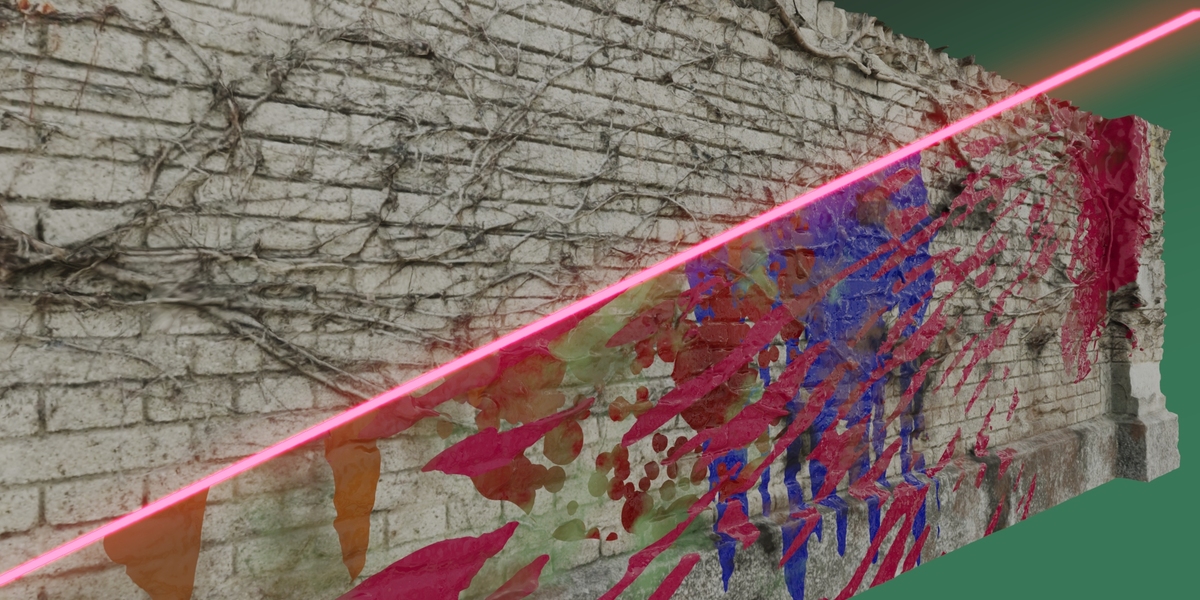
Top Layer is a Blender add-on by GhostVertex for adding procedural dirt, rust, splashes, and liquid stains to existing materials. It is intended for asset aging, set dressing, and visual storytelling. Its effects use procedural shaders, so they require no image textures or UV unwrapping. Top Layer supports Cycles and Eevee.
The listings give different Blender version ranges: Superhive lists versions 4.5 through 5.3, while the AnyPlugins page lists 4.5 through 5.2. Check the developer's listing for your exact Blender release before installing.
Applying effects to objects
Top Layer's controls appear in the N-panel of Blender's 3D Viewport. Choose an effect from the Dirt/Cracks or Liquids category, select the objects, and click Add Layer. The add-on can distribute unique splatter effects across multiple selected objects. Each object needs at least one material; objects without materials are ignored.
The effect's center starts at the 3D cursor. Top Layer adds an Empty that lets you reposition, scale, or rotate the effect. The Empties are collected in a TopLayer_Empties collection. You can manage layers for one material, an object, or objects linked to the same effect Empty.
Layer control and renderer notes
Top Layer adds node groups to the selected objects' materials and places the effect after the material output. It is designed for a single material output; if an effect causes problems, check whether the material has more than one output node. The add-on can use the material's existing normals for directionality. If you enable Vertex Paint, it adds an attribute that lets you limit an effect or make it more transparent in selected areas. Vertex Paint edits must be made on each object separately.
The effects may take longer to appear in Eevee than in Cycles. Dirt layers marked AO affect geometrically tight spaces. In Cycles, their position stays fixed; in Eevee, it can shift slightly with the viewing angle. For an Eevee animation, the developer recommends using an effect without AO and shaping it with Vertex Paint.
For a moving object, animate the effect Empty with it or parent the Empty to the object. Baking makes the effects usable with rigs. The developer's documentation describes installation, layer controls, Vertex Paint, and these limitations.
Demo and product details
The demo includes two dirt effects and one liquid effect. The developer links to a free demo on Gumroad; the Superhive listing says its lowest price is $1 and lists the license as GPL. Check the Superhive product page for current full-version pricing and terms before downloading.