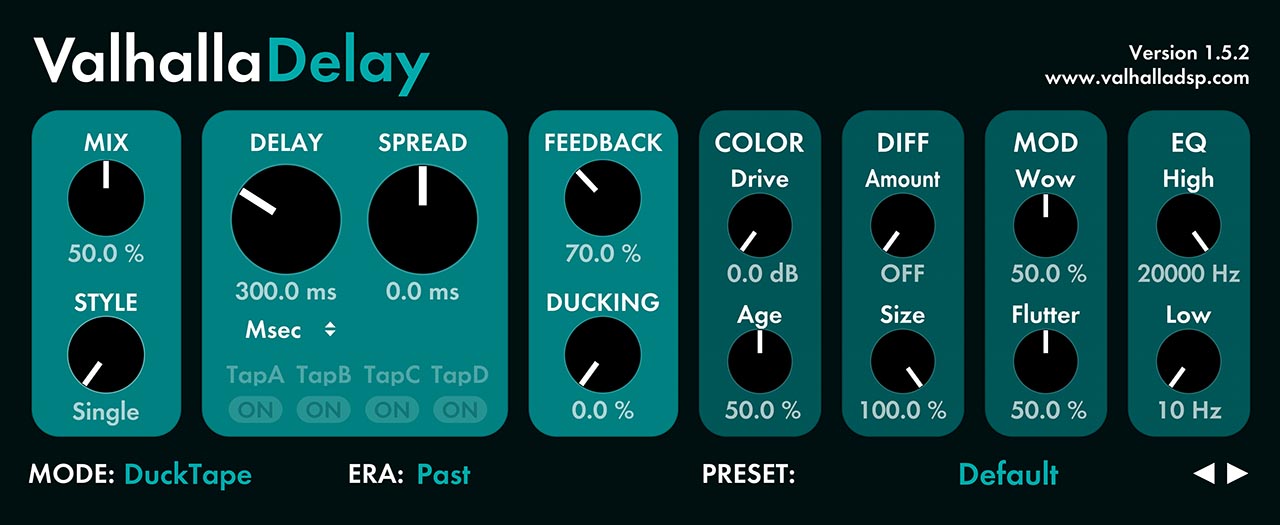
Valhalla Delay is an effect plugin for producers shaping echoes, stereo movement, loops and diffuse tails. Its algorithms cover tape, bucket-brigade and digital delay, with additional frequency shifting, pitch shifting, reverse playback and diffusion. That range suits straightforward tempo-synced repeats as well as evolving textures and long loops.
Choose the repeat character
The MODE control selects the delay algorithm, and the interface changes to show the controls used by that mode. Tape models the variable motor speed and artifacts of RE-201 and RE-301 tape echoes. Its wow and flutter follow the delay time. HiFi gives more direct control over modulation and equalization; its random wow and flutter rates do not follow delay time, and it has no tape splice artifacts. Chrome Tape keeps a tape character with greatly reduced feedback noise and no splice artifacts.
The BBD mode makes darker, noisier repeats with limited high-frequency response. Digital is a higher-bandwidth style based on 1980s delay units; its Age control lowers bit resolution, with 50% corresponding to 12-bit delay. Analog has twice BBD's frequency bandwidth and half its noise; it is brighter than a real BBD but less bright than a digital delay. For more altered repeats, Ghost adds frequency shifting, Pitch shifts the delayed signal by semitones, and Reverse Pitch plays incoming material in reverse while shifting its pitch.
Set the stereo pattern
The STYLE control sets the relationship between the left and right delay channels and the number of delay voices in each channel. These modes are useful starting points:
- Single: Both channels share a delay time and modulation waveform while remaining separately processed. Spread can widen a mono input.
- Dual: Set separate left and right delay times. Each channel feeds back on itself, with modulation offset by 90 degrees between channels.
- Ping Pong: Feedback alternates between the left and right delays. Separate delay times let you set the rhythm of each side.
- Ratio: Set the right delay as a proportion of the left. Ratios below 100% build echo density as feedback increases; at 61.8% with higher feedback, the developer describes a pseudo-reverb sound.
- Quad: Switch up to four tape-head taps on or off and adjust their spacing. Repeat/Swell changes the feedback behavior.
Shape the tail or make a loop
Delay times range from 0 milliseconds to 20 seconds. Set them in milliseconds or sync them to the beat with straight, dotted or triplet timing. The long range supports looping, while short settings cover flanging and slapback echoes.
Diffusion works with any delay mode. Amount controls the diffusors' coefficients, while Size sets the diffusion network length relative to the delay time. This can soften the attack of repeats or turn them into a smooth, reverb-like tail. Diffusion uses a dense, modulated network and has no separate on/off switch.
Age changes modeled noise and artifacts, and Drive adds warmth, crunch or stronger feedback effects. The BBDuck, Clarity, DuckTape, PitchDuck and LoFi modes include a single-knob ducking control: the input level guides the feedback and output level, without separate threshold, attack or release settings.
Compatibility and licensing
Valhalla DSP lists Valhalla Delay at $50 USD. The product page lists 64-bit VST2.4, VST3 and AAX formats for Windows, and those formats plus AU for macOS. It lists Windows 7, 8, 10 and 11, and macOS 10.9 through Tahoe, with Intel and Apple silicon support. The support information says Linux, RTAS and 32-bit builds are not supported. The AAX version is AAX-Native, so it runs on the computer in an HDX system rather than on its DSP hardware.
A purchase covers the supported plugin formats for the DAWs you own and personally use, and Valhalla DSP says you can install the plugin on as many computers as you own and personally use. Authorization uses a license keyfile.