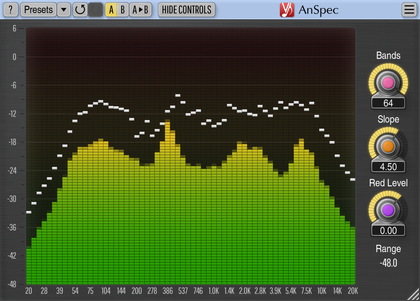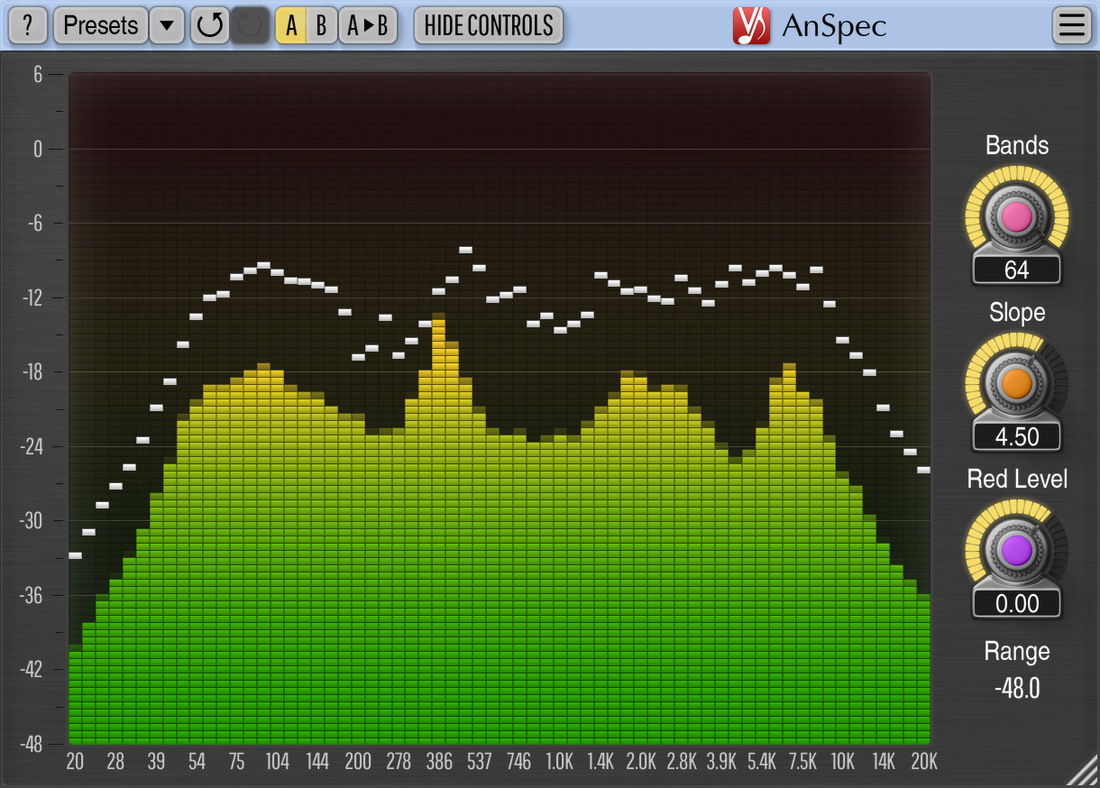
Voxengo AnSpec is a spectrum analyzer plugin for viewing frequency balance in a DAW. It displays audio across selectable bands and includes a peak-level indicator, making it useful for checking prominent frequencies while balancing mono or stereo material. Its band splitting is used for analysis and is not applied to the plugin output, so AnSpec provides visual monitoring rather than equalization. AnSpec has zero processing latency and supports all sample rates.
Adjust the spectrum display
AnSpec's analog-style display has a natural upward slope of about 3 dB per octave. Change the Slope setting to alter that display tilt, or select a different band count to divide the input signal differently for analysis. Range sets the meter's display span in decibels; drag its value or double-click it to enter a number. You can set the Red Level threshold for the peak indication, adjust spectrum ballistics in the Settings window, and hide the controls to make more room for the spectrum. The window is resizable and has selectable color schemes.
The AnSpec user guide explains these controls, including how to change the display range.
Host and system fit
Voxengo lists AnSpec as free. Its Mac downloads include AudioUnit, AAX, and VST3 builds; Windows downloads include VST, VST3, and AAX. The host must support the corresponding plugin format. Voxengo lists hosts such as Ableton Live, Cubase, Logic Pro, REAPER, Pro Tools, FL Studio, and Studio One. AnSpec supports macOS 10.12 and later unless Voxengo announces a version as unsupported. It has native Apple Silicon support and Windows builds. The minimum requirements are a 2.5 GHz dual-core processor and 4 GB of RAM. Check the current compatibility details for your host and operating system. The product page and guide do not specify separate license permissions.