Yawp - Yet Another Weight Painter (YAWP) is a Blender extension for character artists, riggers, and technical artists working with vertex groups. It brings group lookup and weight editing into one sidebar panel, which can help when a rig has hundreds of groups with different naming conventions. Select vertices to find a group by its average weight, inspect immediate parent-child relationships, and adjust weights from the same panel.
Find groups from a vertex selection
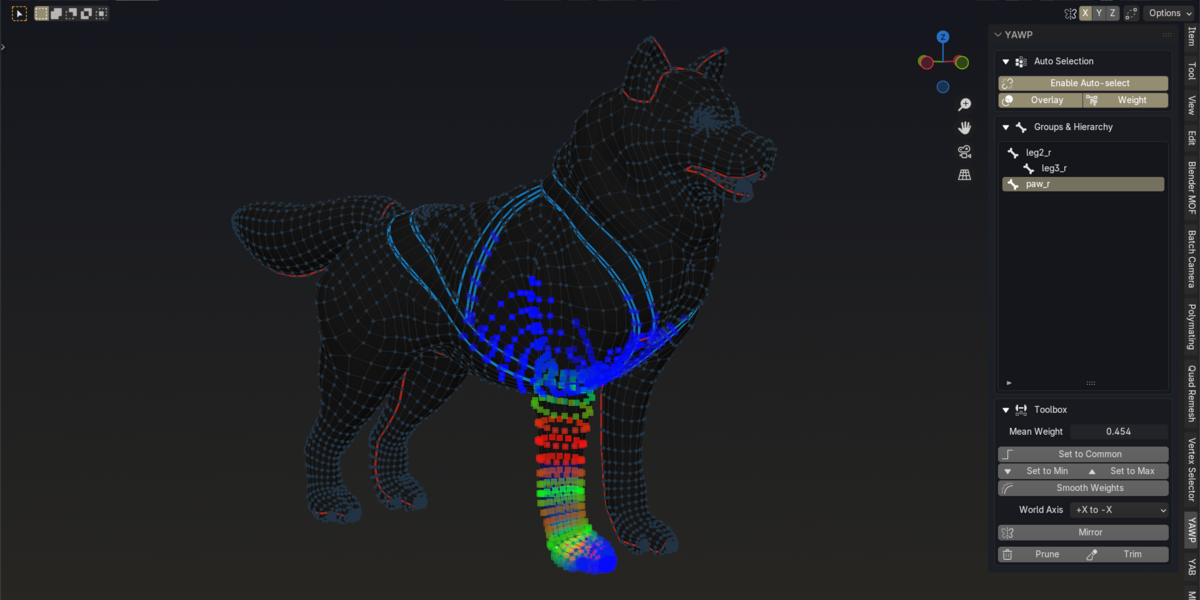
YAWP's Auto-selection chooses a vertex group based on the highest average weight among the selected vertices. To see the group weights in the viewport, enable Blender's Vertex Group Weight overlay or use YAWP's Weight toggle. The Influence Overlay temporarily highlights vertices influenced by groups that co-affect the active group. In Hierarchy View, select vertices or a bone to show immediate parent and child relationships. You can click an item in the list to make that vertex group active.
Adjust weights from the YAWP panel
The panel includes several common weight-editing tools for Edit and Weight Paint work. The Mean Weight slider changes the selected weights while preserving their relative differences. Set to Common, Min, or Max applies the most common, lowest, or highest selected value. Other tools cover smoothing, mirroring across a world-space axis, removing smaller disconnected clusters, and setting weights outside the selected boundary to zero. These tools work without changing modes.
- Mean Weight: Adjusts the mean while retaining per-vertex offsets.
- Set to Common, Min, or Max: Applies a selected value from the current vertex weights.
- Smooth: Applies YAWP's custom weight-smoothing tool.
- Mirror: Copies weights across a chosen world-space axis.
- Prune: Keeps the largest connected weight cluster and removes the others.
- Trim: Sets weights outside the selected boundary to zero.
Install and check mesh-density performance
The listing identifies YAWP as a Blender 4.2+ extension and gives its Blender Version as 4.2 to 4.5. Download the ZIP named yawp, then in Blender open Edit > Preferences > Get Extensions, open the dropdown, and choose Install from Disk. After installation, press N in the 3D Viewport, then open the YAWP tab and panel in the sidebar. The guide recommends starting with a mesh that has an armature and vertex groups.
The product page describes Auto-selection performance as near native, while noting that its threading overhead may become noticeable at higher vertex density. Consider that when using it on dense meshes. The guide also notes that cached values can lag briefly; nudging the interface can refresh them. YAWP is listed under the GPL-3.0-or-later license. See the YAWP user guide and product listing for the creator's setup notes and current details.