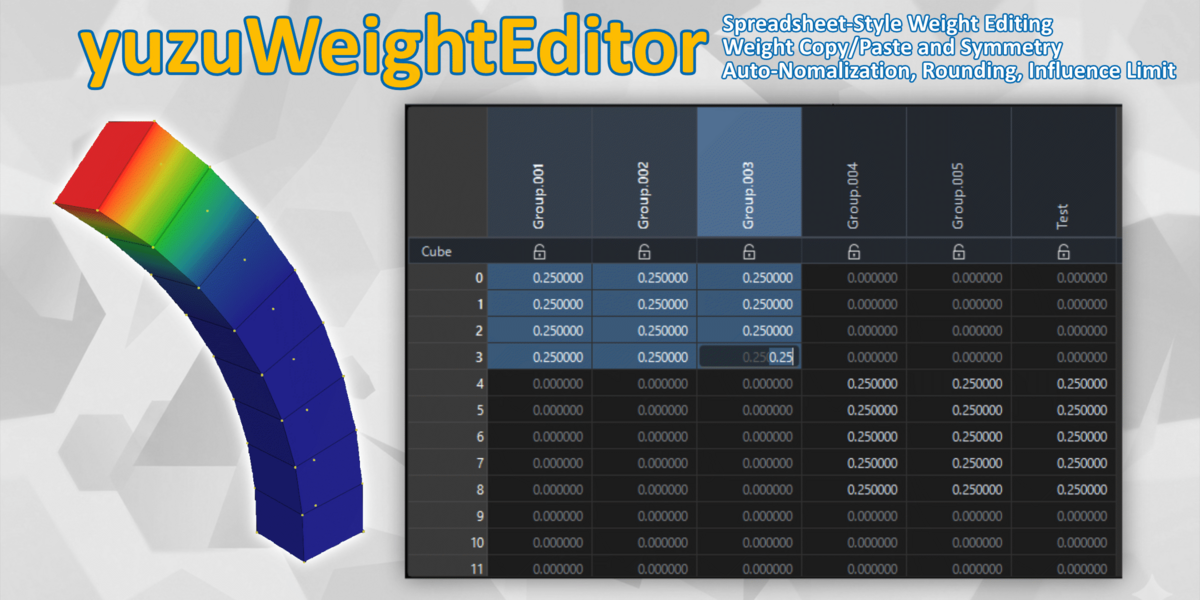
Yuzu Weight Editor is a Blender add-on by Yuzurin for viewing and editing vertex-group weights in a spreadsheet-style editor. Inspired by Maya's SiWeightEditor, it opens a separate window built with PySide6. The sheet divides groups into All, Deform and Other tabs, with options to show selected vertices, all vertices on the object, or a view linked to the 3D viewport. Selection can sync between the sheet and viewport, and sheet selections can be highlighted in the scene.
Edit and check vertex weights
You can edit cell values directly or enter a number for several selected cells at once. Numeric controls support absolute values, adding or subtracting an amount, and adding a percentage of the current value. The display can use a 0–1 or 0–100 range. Rounding, normalization and influence limits help when adjusting weights; a limit of 0 means unlimited influences. With no cells selected, some operations, such as limiting influences, apply to the whole sheet.
- Check influence counts and find vertices with insufficient or excessive total weight, then show only the flagged vertices.
- Copy and paste weights by cell, vertex or object. Mirror-paste uses the symmetry naming dictionary, and weight symmetry can be applied from the editor.
- Transfer weights between selected mesh objects, lock cells or vertex groups, and use cleanup tools to remove groups with zero weight across every vertex or add missing vertex groups when a related armature has bones without corresponding groups. Bind is available when one armature and one or more mesh objects are selected; Unbind removes the armature modifier and clears armature parenting if present.
- Adjust bone collection visibility and controls for armature, modifier and weight display from the editor.
Weight Hammer and Weight Smooth are marked experimental. The Realtime Weight Apply preference controls whether slider-based edits are applied in real time; disable it if the editor feels heavy.
Install and open the editor
- Install the add-on from Blender's Preferences under Add-ons, using Install from Disk, then enable yuzuWeightEditor in Edit > Preferences > Add-ons.
- If Blender reports that PySide6 is missing, open View3D > Sidebar (N) > yuzuWeight and choose Install PySide6. Restart Blender after installation finishes.
- Open View3D > Sidebar (N) > yuzuWeight and choose Open Editor. Select the mesh and vertices you want to work with.
The marketplace compatibility field lists Blender 4.2–5.1, while the product's Requirements section names Blender 4.2 LTS and Blender 5.0 as requirements. Check Yuzurin's product page for the current compatibility details. The installation documentation covers add-on setup. The released add-on supports an English interface, even though its screenshots and GIFs show the Japanese UI.