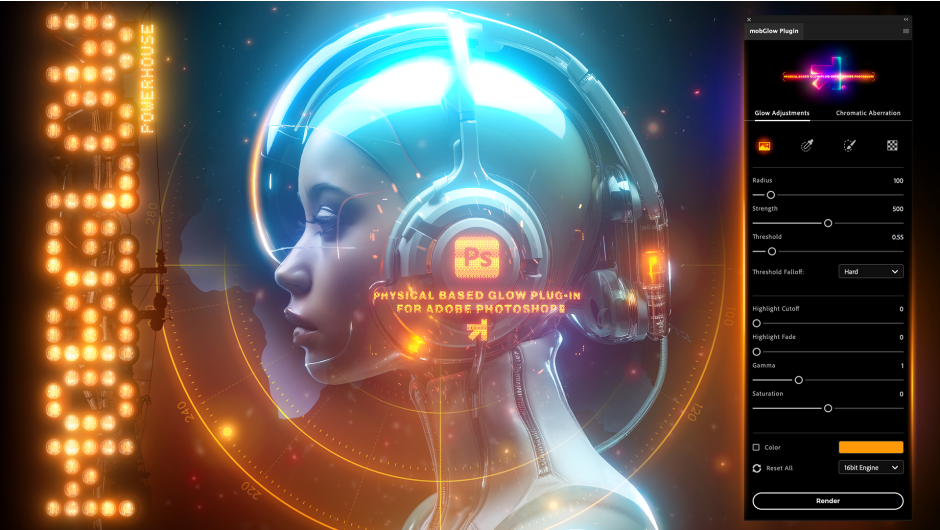
mobGlow is a Photoshop plugin for creating glow around lights in an image using inverse-square falloff. Its developer describes the effect as physically correct and says it can recreate soft, dreamy looks associated with diffusion filter lenses and older films. The product is aimed at photo editors, CGI artists, digital painters and graphic designers.
Shape glow by tone and color
The threshold and falloff controls have three modes and can range from light to dark. This lets you target highlights or extend the glow across more of the image. A color sampler selects a particular image color, while the color control tints the resulting light. Highlight Cutoff can exclude the brightest spots so the glow affects midtones; Highlight Fade reduces the bright core.
Chromatic aberration controls add color separation along glow edges. You can choose the channels involved and adjust their split distance and blur.
Mask, render and composite
Use the quick mask tool to paint where the glow appears. Its mask stays in a channel slot for later editing or resetting. For more complex areas, the listing describes masking with selections, brushes or gradients.
mobGlow creates an alpha channel so the black background becomes transparent when you composite the effect with other layers. Its non-destructive workflow also lets you select a rendered glow and click Render to restore that effect’s settings for further changes. The plugin supports 32-bit mode for HDR glows.
Photoshop support and trial
The listing specifies Photoshop 24.2.0 or later, Mac and PC support including Apple M-chip computers, and compatibility entries for Photoshop 2023 through 2027. It supports Photoshop in any language. The download includes one .ccx plugin and an illustrated PDF guide. A free limited trial is available to check compatibility before purchase. See the mobGlow product listing on aescripts for its trial and compatibility details.