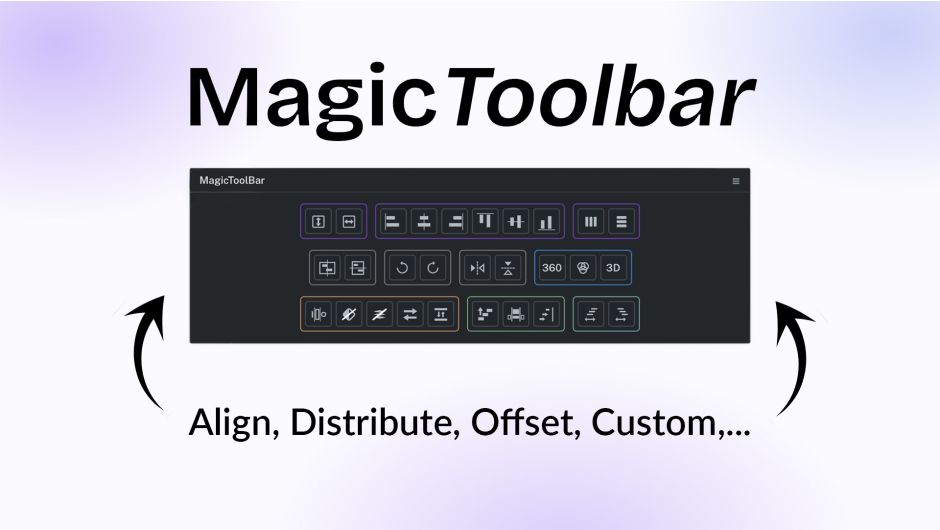
MagicToolbar is a dockable panel for Adobe Premiere Pro, developed by Médéric Soltani. It puts clip alignment, spacing, transforms and timeline arrangement within reach while clips are selected, so editors can run these actions from the timeline panel without opening Effect Controls.
Align clips and set exact spacing
Choose the sequence, a track such as V1, or a reference clip as the alignment basis. With a clip selected as the reference, MagicToolbar can align other clips to its edges or center, or match their width or height. Distribution tools space clips horizontally or vertically with a pixel gap, measured edge to edge or center to center.
Alignment can account for a clip’s Transform and Flip effects and adjustment layers above it. Animated values are read at the playhead, and the alpha channel is considered for still images such as PNG, TIFF and PSD files. A rotated or skewed Transform effect is a documented limitation: MagicToolbar ignores it during alignment.
Arrange clips on the timeline
- Spread lays selected clips out in a staircase across successive tracks.
- Tower keeps the first selected clip in place and stacks the others above it, aligned at their starts. It skips occupied tracks and creates missing ones.
- Offset sets a stagger between clips in frames or seconds, using a numeric value or mouse drag. The linked audio follows its video for this action.
- Re-stack aligns each video clip with its audio, trims pairs to their shared range and packs them down. Extend lengthens selected clips to the end of the latest clip.
Clips moved by Tower or a timeline Swap lose their video/audio link because of a Premiere Pro API limitation, but stay in sync. Relink them with Cmd+L on macOS or Ctrl+L on Windows.
Transform clips and keep frequent actions close
Mirror clips horizontally or vertically, rotate them 90 degrees left or right, swap two clips on the timeline, or exchange their Motion parameters. Other commands remove all keyframes or effects from selected clips, or select every clip between the sequence’s In and Out points.
You can add up to six custom buttons for effects and effect presets, with a chosen icon and editable name. This makes the panel useful for editors who repeat the same alignment, spacing or timeline tasks across a sequence.
Requirements
MagicToolbar requires Premiere Pro 26.2 or later and an operating system of macOS 12 or later or Windows 10 22H2 or later. On macOS, MagicToolbar needs Accessibility permission to run keyboard shortcuts and scripts; Premiere Pro prompts for it on first use. See the MagicToolbar product page for the current listing and details.